
Streaming has transformed how we watch television, and Hulu is one of the leading platforms offering both on-demand content and live TV. From hit TV series and blockbuster movies to live sports and news, Hulu provides flexibility that traditional cable once dominated.
However, many users still ask: How do you record on Hulu? Whether you want to save a live sports game, capture a news broadcast, or archive a favorite show for offline viewing, understanding your recording options is essential.
In this guide, we’ll explore whether and how you can record on Hulu, as well as discuss FAQs about recording on Hulu. Let’s break it down step by step.
1. Can You Record Hulu Live?
Yes – but only if you’re subscribed to the correct plan.
Standard Hulu (on-demand only) does not allow traditional recording because its content library is already available to stream anytime. However, if you subscribe to Hulu + Live TV , you gain access to live channels along with Cloud DVR functionality.
What Is Hulu + Live TV?
Hulu + Live TV is Hulu’s cable-replacement streaming package. It provides:
- Access to live channels (sports, news, entertainment)
- Built-in Cloud DVR storage
- Multi-device streaming
- On-demand Hulu library access
With this plan, you can record live programs without external hardware.
How Does Hulu DVR Work?
Instead of recording to a physical DVR box, Hulu uses Cloud DVR . This means:
- Recordings are stored online in your account
- No extra equipment is required
- You can record multiple shows simultaneously
- Recordings are accessible across devices
Most Hulu + Live TV plans now include unlimited DVR storage , with recordings typically saved for up to 9 months.
2. How Do You Record on Hulu?
2.1 Record Hulu Live with Hulu DVR
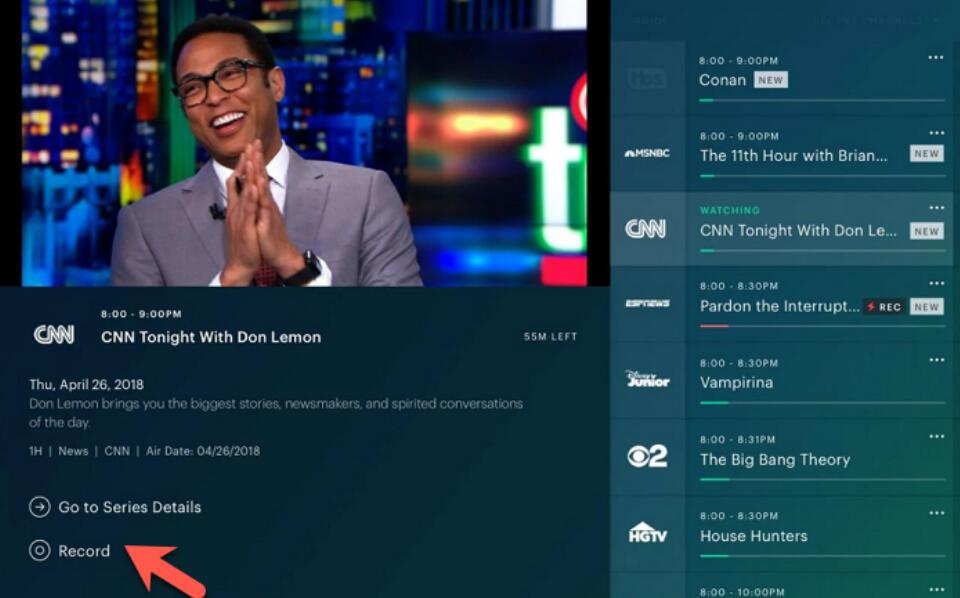
If you’re subscribed to Hulu + Live TV, recording is simple with these steps:
- Open Hulu on your Smart TV, streaming device, web browser, or mobile app.
- Browse the Live TV guide or search for the show, movie, or sports event you want to record.
- Click on the program’s details page and click on the “Record” option.
- After the program finishes airing: Go to My Stuff > 导航至 录音 > Select and play your saved content.
Advantages of Hulu DVR :
- 无需安装任何软件
- Unlimited storage (with current plans)
- Seamless integration with Hulu
- Automatic series recording
Limitations of Hulu DVR :
- Recordings expire after 9 months
- Some plans restrict ad-skipping
- Cannot permanently download content to your device
- No external file export
If you need more permanent control over your recordings, a screen recording tool may be a better option.
2.2 Record Hulu Live with Swyshare Recordit
If you want to permanently save Hulu Live content as video files on your computer, you can use third-party screen recording software like Swyshare Recordit 。
Unlike Hulu’s Cloud DVR, Recordit captures the video directly from your screen, allowing you to store the file locally. Swyshare Recordit is a professional screen recording tool designed to capture streaming video, live broadcasts, webinars, and more. It records high-quality video with system audio and saves it in common formats like MP4.
为什么使用 Recordit to Record Hulu?
- Choose to record the whole screen, a defined area, or an individual app window.
- Set up timed recordings using Windows Task Scheduler or macOS automation tools.
- Export recordings in HD/4K and common formats such as MP4, AVI, GIF, and more.
- Capture both system audio and microphone sound simultaneously for complete recordings.
- Add webcam video to your screen recordings for commentary or picture-in-picture style.
- Resize canvas, add background images, insert watermarks, and fine-tune recordings.
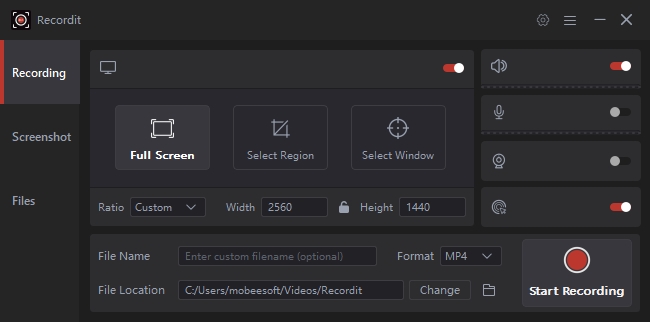
Steps to Record Hulu Live with Recordit :
- 下载并安装 Recordit software on your Windows or Mac computer.
- Open Hulu in a web browser and log into your account, then navigate to the live content you want to record.
- 打开 Recordit to select full screen or custom recording area, enable system audio and choose output format and resolution.
- Click the Start Recording button before the live program begins.
- When the program ends, stop the recording and the file will be displayed whthin the software “Files” tab.
3. FAQs About Recording Hulu Live
1) Is Screen Recording Hulu Legal?
Recording for personal use may be allowed in some regions, but redistribution or sharing copyrighted content is illegal.
2) Can I record Hulu in 4K?
Hulu offers limited 4K streaming for select content. If streaming in 4K on a supported device, Recordit can capture in high resolution depending on your recording settings and hardware capability.
3) Can I keep Hulu DVR recordings forever?
No. Hulu Cloud DVR recordings typically expire after 9 months. If you need permanent storage, a screen recorder like Recordit allows you to save files locally without expiration.
4) Can I edit Hulu DVR recordings?
No. Hulu Cloud DVR recordings cannot be edited. However, recordings captured with Recordit can be trimmed or enhanced using built-in editing tools or third-party video editors.
5) What’s the main difference between Hulu DVR and Recordit ?
- Hulu DVR: Cloud-based, automatic, simple, but temporary and non-downloadable.
- Recordit : Local recording, permanent files, editable, but requires manual setup and sufficient storage.
4。结论
Recording on Hulu is simple once you understand your options. With Hulu + Live TV, the built-in Cloud DVR lets you easily record live shows and access them across devices — no extra setup required. However, recordings expire and can’t be downloaded or edited.
If you want permanent storage, flexible formats, and full control over your files, Swyshare Recordit is the better solution. It allows you to capture Hulu Live directly to your computer and keep your recordings without limitations.
Choose Hulu DVR for convenience — choose Recordit for control and long-term access.